
TOOLS & TOYS - EniG. Software

EniG. Change Code Page
Version: 2.8
Revision Date: 2014/04/2
Type of software: Freeware
Operating system: Windows 9x/NT/2000/XP/Vista/7/8
Required files: msvbvm60.dll
Download:
ccp.zip (29 kB)
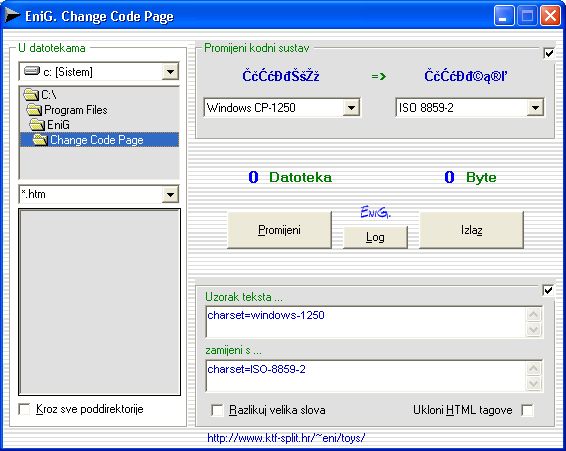
EniG. Change Code Page is a small, fast and useful portable application for Windows 9x/NT/2000/XP/Vista/7, 32-bit or 64-bit, whose primary role is converting web pages writen in any tool in MS Windows (cp-1250) in to iso 8859-2 or UTF-8 standard.
Conversion of *.html documents from one code system to another can be done:
- in only one file - it is enough to click on the file twice
- in a marked group of files - you can select which files will be used with SHIFT and CTRL
- in a marked group of files - you can select which files will be used with SHIFT and CTRL using a preset mask - in all of the files that meet the given criteria, eg. a*.html for all HTML files that begin with the letter 'a', in the current directory or in any of it's subdirectories, in other words the whole web site.
Change Code Page in pure text files (.html, .txt) can:
- convert Croatian letters between diferent coding systems
- convert any coding system
- do the ussual but fast Search & Replace
- remove all HTML tags from a file, leaving only pure text
automaticaly in all files that meet the given criteria (mask).
If you want to use the regular Search & Replace it is enough to click in the top right corner of the screen.
New, faster, better routines for searching and replacing have been written. Each letter of the Special letter group must be put separately in the ccp.cft file. There can only be 32000 letters in one set. ESC key terminates the process.
USE
- The teoretical limit of the file you can work with is 2 GB.
- There are two groups of Special letters which allow the user to define the two groups of letters according to their own needs such as lenght and number of letters in a set.
- You can replace groups with different number of letters, eg. a group of 10 Croatian letters with a group of 7 personaly defined letters. The letters that don't have a pair will be replaced with s "", in other words they will be chosen from the text. On the other hand, if you replace a group with 7 letters with a group with 10 letters, the last 3 letters will be ignored.
- The program can generate ccp.log files which contain data about all of the files and changes made in them. Each time you turn the program on, it deletes the old log file. Generation of the ccp.log file can be turned on/off in the configuration file (ccp.cfg).
|
|
The program window is devided in to 3 parts:
|
- CP-1250 - use MS windows to see Croatian letters
- ISO 8859-2 - is recomended for Croatian Web space
- CP-852 - use IBM/MS-DOS from 1990
- CROSCII - is the old standard that replaced some letters from the ASCII table with Croatian letters. It is also known as CP-999
- BEZKVAKI - Croatian letters will be transformed into pure ASCII
- SYMBOLIC HTML TAGS - some editors save Croatian letters as symbolic HTML tags. This table is equal to CP-1250 and is saved in this format in Word when you give the "save as HTML" command.
- MS WORD 2000 SYMBOLIC - MS Word 2000 sprema dio naših grafema kao "Symbolic HTML tags" kad mu se dade "Save as HTML". Tablica symbolic html tagova ugrađena u ccp odgovara CP-1252.
- UNICODE - Croatian graphems under Unicode standard. The table of symbolic html tags integrated in the ccp is UTF-8.
- SPECIAL LETTER GROUPS - you can enter any group of letters trough the configuration file. Define the names of the 2 separate sets of letters and letters they contain in the ccp.cfg file. Left from the equality sign is the first set of letters and right from the equality sign is the second. Don't put space before and after the equasion sign because it is considered a letter. Rows that have NE MIJENJATI OVAJ RED (DO NOT CHANGE THIS LINE) warning shouldn't be touched because the program works trough them. Definitions begin right after that line, without a space. By leaving out the equasion sign you can define only one special letter group.
After you define the two special letter groups in the ccp.cfg file they are added to the list and in the menu of the "old" and "new" code page as:
- SPECIAL 1 - user defined "letters"
- SPECIAL 2 - user defined "letters"
Another pair of "letters" ends right after you press ENTER at the end of the line. The longest "letter" I tried had 1400 letters.
So the browser can understand the code page he should use, put a META tag in the caption of the HTML document. The table of standards as seen in Your browser when the META TAG is used: META HTTP-EQUIV="Content-Type" CONTENT="text/html; charset=utf-8"
| UTF-8 | ć | Ć | č | Č | đ | Đ | š | Š | ž | Ž |
| CP-1250 | ć | Ć | č | Č | đ | Đ | š | Š | ž | Ž |
| ISO 8859-2 | ć | Ć | č | Č | đ | Đ | ą | © | ľ | ® |
| CP-852 | † | ¬ | Ľ | ¬ | Đ | Ń | ç | ć | § | ¦ |
| CROSCII | } | ] | ~ | ^ | | | \ | { | [ | ` | @ |
| bezkvaki | c | C | c | C | d | D | s | S | z | Z |
STATUS
EniG. Change Code Page is FREEWARE software product.
You can use this program freely for private or business purposes, or distribute it to others, provided you do not gain any financial profits from it and provided you do not change the content of the files. The program cannot be distributed for commercial purposes without prior consent from the author.
AUTHOR
Eni Generalić
Faculty of Chemistry and Technology
Teslina 10/V, 21 000 Split, Croatia
e-mail: enig@periodni.com
URL: https://www.periodni.com/
INSTALL PROGRAM
System requirements: Every 32-bit or 64-bit PC with Windows operating system
You can download a zip file of Change Code Page without VB library (73.7 kB). Unzip the files and run the program.
After unzip the ccp folder contains the following files:
- ccp.exe - the program itself
- ccp.cfg - configuration file
- file_id.diz - short program description
- readme.txt - program description
Perhaps you'll also need file MSVBVM60.DLL. This is basic file for programs written in Visual Basic 6.0. If you haven't, download this file msvbvm60.zip - 689 kB (version 6.0.84.95; May 10, 1999) and unzip in the c:\Windows\System\ or to the folder containing the program.
REMOVE PROGRAM
EniG. Change Code Page is portable application. Just delete extracted files.
DISCLAIMER
The author shall not be responsible for any damages, direct or indirect, which may result from the use of this software.
Should you find any bugs, or in case you have any good ideas on improvements, please contact me by e-mail:
Enjoy!


Citing this page:
Generalic, Eni. "Change Code Page." EniG. Periodic Table of the Elements. KTF-Split, 18 Jan. 2024. Web. {Date of access}. <https://www.periodni.com/enig/ccp-en.html>.


