
TOOLS & TOYS - EniG. Software

EniG. Serbian->Croatian Translator
Version: 1.8
Revision Date: 2020/10/04
Type of software: Freeware
Operating system: Windows 9x/NT/2000/XP/Vista/7/8/10
Required files: msvbvm60.dll
Download:
sr2hr-prevoditelj.zip (490 kB)
Last update of Dictionary files: 2020/10/24
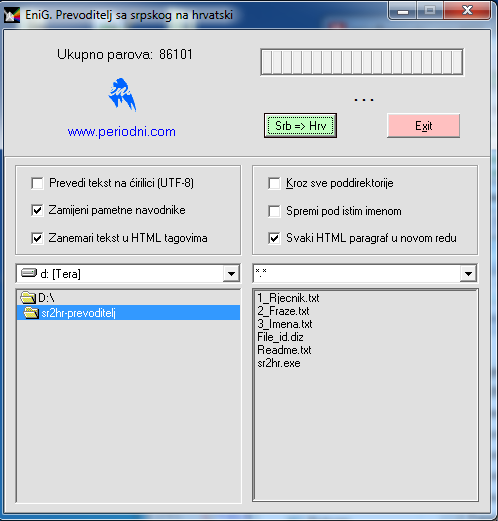
The Serbian to Croatian translator designed by EniG. is a free Visual basic program for all Windows platforms that can translate texts, subtitles for movies or whole web pages from Serbian to Croatian. Since the translation is done word for word the translations are usually fairly accurate. However, the result should still be checked for errors as the program doesn't fix grammar.
The program was developed at the end of the previous century as a simple, automatic search&replace which worked with pure text files. I frequently had ideas on how to optimize the program or rewrite it C so that, aside from minor differences, everything would remain the same. You must be familiar with the first engineering law: If it works - do not touch it. Sr2Hr does it's job really well.
The most important thing in the program are the dictionary files which grow with each read (translated) book. For over 10 years I've added new translations for terms I find while reading. If you decide to improve on the program yourself I would love it if you mailed me (enig@periodni.com) only the words and translations that you added (not the entire dictionary) so I could include your (along with other such enthusiasts) effort in to the program for all to enjoy.
Along with the program (sr2hr.exe) there are three dictionary files:
- 1_Rjecnik.txt - the main dictionary file which contains over 90 000 word pairss.
- 2_Fraze.txt - contains various combinations that ended up being invalid due to changes in gender of a noun or if the translation was wrong due to multiple meanings of the word. Terms from this file are searched for in the text (reverse from how it works in 1_Rijecnik.txt).
- 3_Imena.txt - names of cities, people or special names from books are found here. Terms from this file are searched for in the text. Only during translation from this file does the program make a difference between uppercase and lowercase letters (case sensitive).
USE
- The teoretical limit of the file you can work with is 2 GB.
- New terms can easily be added to the end of the dictionary (they don't have to be sorted alphabetically).
- The text you are translating can be saved under the same name or you can add "_hr" to the end of it (before it's extension).
- The translation can be done for a single file, multiply files or the translation can be done on a whole directory and all of it's subdirectories.
STATUS
EniG. Serbian->Croatian Translator is FREEWARE software product.
You can use this program freely for private or business purposes, or distribute it to others, provided you do not gain any financial profits from it and provided you do not change the content of the files. The program cannot be distributed for commercial purposes without prior consent from the author.
AUTHOR
Eni Generalić
Faculty of Chemistry and Technology
Ruđera Boškovića 35, 21 000 Split, Croatia
e-mail: enig@periodni.com
URL: https://www.periodni.com/
INSTALL AND UNINSTALL PROGRAM
Install: Download the ZIP package and extract to a folder of your choice.
After extracting the sr2hr folder contains the following files:
- sr2hr.exe - the translation program itself
- 1_Rjecnik.txt - main dictionary
- 2_Fraze.txt - auxiliary dictionary with phrases
- 3_Imena.txt - auxiliary dictionary with personal and geographical names
- file_id.diz - short program description
- readme.txt - program description
System requirements: Every 32-bit PC with Windows 9x, NT, 2000, XP, Vista, 7, 8 or Windows 10 operating system
Perhaps you'll also need file MSVBVM60.DLL. This is basic file for programs written in Visual Basic 6.0. If you haven't, download this file msvbvm60.zip - 689 kB (version 6.0.84.95; May 10, 1999) and unzip in the c:\Windows\System\ or to the folder containing the program.
Uninstall: Just delete extracted files.
DISCLAIMER
The author shall not be responsible for any damages, direct or indirect, which may result from the use of this software.
Should you find any bugs, or in case you have any good ideas on improvements, please contact me by e-mail:
Enjoy!


Citing this page:
Generalic, Eni. "Serbian->Croatian Translator." EniG. Periodic Table of the Elements. KTF-Split, 18 Jan. 2024. Web. {Date of access}. <https://www.periodni.com/enig/sr2hr-en.html>.


